

ComTestSerial
Free Download of ComTestSerial
MicroRidge manufactures a variety of serial interface devices. We had a need for a fast, effective and easy-to-use serial test communications program. We developed ComTestSerial to meet that need, and are offering it free of charge to anyone who has a need for a test program to help them understand the output of their serial device.
Version 3.1.0.135
Released March 30, 2022
Important Distribution Notes:
ComTestSerial can be installed on as many computers as needed.You can also give ComTestSerial to anyone who has a need for a serial communications test program.You cannot modify the ComTestSerial program file in any manner.Unless you have written permission from MicroRidge, you cannot distribute ComTestSerial with any other software or hardware that is being sold or licensed.ComTestSerial was developed by and is the property of MicroRidge Systems, Inc., Sunriver, Oregon.Copyright 2004-2023 MicroRidge Systems, Inc. All rights reserved.
Why do you need ComTestSerial?
When you cannot get communications between your serial device and your application, you typically need to perform the following troubleshooting steps. These steps are general troubleshooting guidelines. Our experience has shown us that you can save hours and even days worth of troubleshooting if you first get an understanding of the operation of your serial device using a test program such as ComTestSerial.
- Connect your serial device to a serial communications test program such as ComTestSerial.
- Press the send button on your serial device to send information to ComTestSerial or send a command from ComTestSerial to your serial device.
- Find the manual for your serial device to determine what the baud rate and communications parameters should be (yes, I know we all hate to read the manual!).
- If you have multiple serial ports on your PC, change the serial port within ComTestSerial to determine which serial port your device is connected to.
- Refer to the Help Troubleshooting Section in ComTestSerial for additional suggestions.
ComTestSerial Features
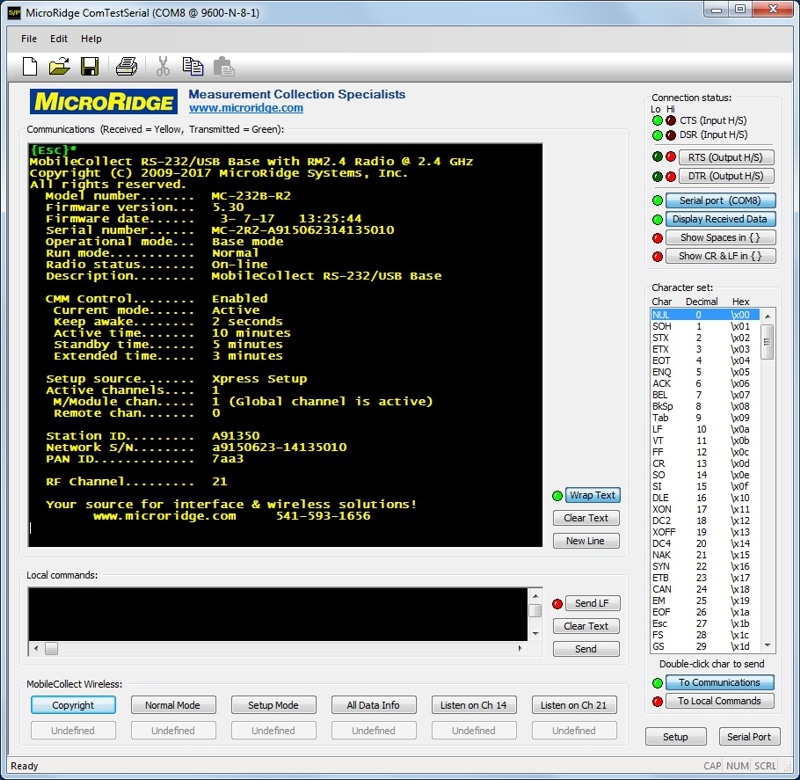
- Much friendlier and easier to use than the HyperTerminal Program included with Windows.
- Install on as many computers as needed.
- Give it to anyone else who needs it.
- Supports COM1 to COM200.
- Supports baud rates from 300 to 115.2K.
- Supports all of the commonly used communication parameters.
- Set printer and screen font sizes.
- 12 user definable buttons for defining commands to send to your serial device.
- Displays all characters including control and extended characters.
- LED status indicators showing state of handshake lines and display parameters.
- Very fast screen updates.
Supported Operating Systems
ComTestSerial has been tested on Windows XP through Windows 10 When installing ComTestSerial, you should have Administrative Rights enabled.