Designed & Made in the USA Since 1983

WedgeLink FAQs

You have questions, we have answers!

A keyboard wedge is used when you are trying to get data from some type of measuring device into applications that cannot accept data from a serial port.  A software keyboard wedge reads data from a serial port and passes this data to a PC application in such a manner that the application thinks the data is entered via the keyboard. 

Software and hardware keyboard wedges are used extensively in data acquisition applications that include statistical programs, spreadsheets, barcode, LIMS, etc.  MicroRidge keyboard wedges can accept input data from any RS-232 serial device.  The data is then passed to a Windows application in such a manner that the application thinks the data is actually coming from the keyboard.

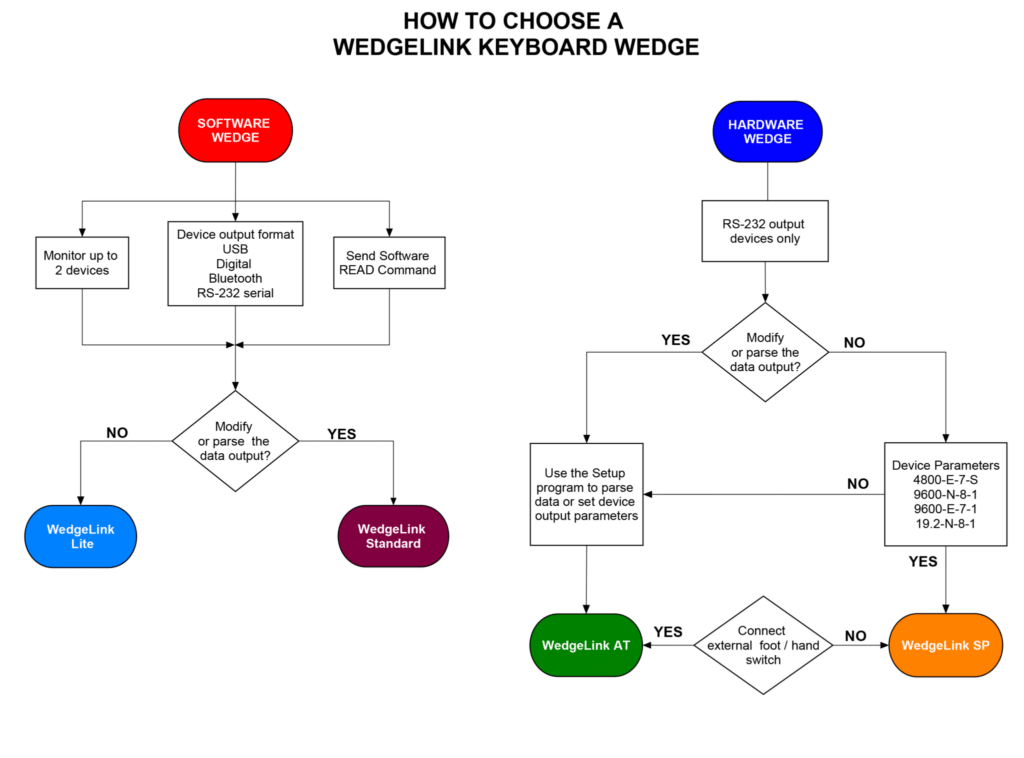
Whether you’re comparing a hardware keyboard wedge to a software keyboard wedge, sizing up the WedgeLink AT against the WedgeLink SP, or troubleshooting an existing setup, the questions below cover the most common WedgeLink questions we hear from customers.

Looking for our other FAQs?​

Don’t see your question? Email info@microridge.com or call 541-593-1656 and we’ll get you an answer. 

What is a keyboard wedge?

A keyboard wedge is hardware or software that converts data from an RS-232 serial device, digital gage, or other instrument into keystrokes a computer reads as if they came from a keyboard. This lets serial-only devices send data into applications that only accept keyboard input, including Excel, Access, web forms, and most SPC software.

What’s the difference between a hardware keyboard wedge and a software keyboard wedge?

A hardware keyboard wedge is a standalone device that sits between your instrument and a USB port. Once configured, it needs no software on the host PC and works the same on Windows, macOS, and Linux. A software keyboard wedge is a Windows application that runs on the PC and reads from a COM port; it offers deeper parsing, math functions, and two simultaneous input ports, but requires a Windows environment and COM port access. Hardware wedges (WedgeLink AT and WedgeLink SP) are the better fit for locked-down PCs and production-floor deployments. See our Hardware vs. Software Keyboard Wedge Guide for the full comparison.

Which WedgeLink model is right for me?

It depends on your instrument’s output and your deployment environment. If your device outputs clean data at a known, fixed baud rate and you want the simplest possible setup, the WedgeLink SP is the fastest path. If the data needs parsing, the baud rate is unknown, or you need a read switch, choose the WedgeLink AT. If you need to run two instruments at once, apply math functions, or already have COM port access on the workstation, WedgeLink Standard software is the better fit. Use the flowchart above for a quick visual walkthrough, or contact MicroRidge and we’ll help match a model to your instrument.

Can a keyboard wedge send gage data straight into Excel?

Yes. This is the most common use of a keyboard wedge. Because Excel only accepts keyboard input, a wedge is what allows a caliper, scale, or hardness tester connected via RS-232 to type a measurement directly into the active cell, with no manual transcription. See our guide to keyboard wedge output into Excel for setup examples, including automatic cell advance and splitting multi-field packets into separate columns.

What instruments work with WedgeLink?

Any device with an RS-232 serial output. Common examples include digital calipers, micrometers, and height gages; bench scales and force/torque gages; hardness testers; surface roughness testers; DROs on manual machines; CMMs with RS-232 output; barcode scanners; and data loggers or PLCs. If you’re not sure whether a specific instrument is compatible, contact MicroRidge with the make and model.

Do WedgeLink keyboard wedges work with SPC software?

Yes. WedgeLink output is compatible with any Windows application that accepts keyboard input, which covers Excel, Minitab, InfinityQS, Access, and most cloud-based or web-based SPC and inspection platforms. WedgeLink Standard can also write parsed data directly to a CSV or TXT file in parallel with keyboard output.