A keyboard wedge is used when you are trying to get data from some type of measuring device into applications that cannot accept data from a serial port. A software keyboard wedge reads data from a serial port and passes this data to a PC application in such a manner that the application thinks the data is entered via the keyboard.Â
Software and hardware keyboard wedges are used extensively in data acquisition applications that include statistical programs, spreadsheets, barcode, LIMS, etc. MicroRidge keyboard wedges can accept input data from any RS-232 serial device. The data is then passed to a Windows application in such a manner that the application thinks the data is actually coming from the keyboard.

Whether you’re comparing a hardware keyboard wedge to a software keyboard wedge, sizing up the WedgeLink AT against the WedgeLink SP, or troubleshooting an existing setup, the questions below cover the most common WedgeLink questions we hear from customers.
Don’t see your question? Email info@microridge.com or call 541-593-1656 and we’ll get you an answer.Â
This happens when the target application’s input buffer can’t keep up with the incoming keystroke rate. On the WedgeLink AT and SP, the transfer rate can be slowed from the default ~72 characters/second down to as low as ~8 characters/second. On WedgeLink software, the Delay tab adds a configurable inter-character delay from 50ms to 2,000ms. Contact MicroRidge if you need help adjusting the rate for your application.
Check the serial interface section of your instrument’s user manual first; baud rate and comm parameters are usually listed there. If you have a WedgeLink AT, Auto Baud Detection can identify them automatically. You can also use ComTestSerial, our free serial communications test program, to view the raw data your instrument is transmitting and work out the correct settings. Our COM port testing guide walks through finding the right port in Windows Device Manager and testing communication parameters step by step.
Only the cable needs to be replaced, not the wedge. WedgeLink AT and SP both use a standard DB9 Male port that accepts any compatible RS-232 cable. Browse RS-232 gage cables for your instrument.
MicroRidge-manufactured hardware, including the WedgeLink AT and SP, is warranted for 12 months from the date of purchase. RS-232 gage cables carry a 30-day warranty from date of shipment. WedgeLink software is warranted to operate per its documentation for 6 months from date of shipment. Full terms are on our Product Warranty & Returns page.
Yes. Technical support is included with every WedgeLink purchase at no additional charge. Email support@microridge.com or call 541-593-1656, or use our contact page.
WedgeLink Lite ($99) is direct pass-through with optional date/time stamping and delimiter conversion, for instruments whose output is already in the format your application needs. WedgeLink Standard ($199) adds a full seven-stage parsing pipeline (match, mask, remove, replace, math, prefix, suffix), up to 5 independent parsing groups, and up to 50 configurable serial commands, for instruments that transmit compound packets requiring reformatting. Both editions support two simultaneous RS-232 input ports. See the WedgeLink Lite & Standard product page for the full feature comparison.
Yes. Both editions support two simultaneous RS-232 input ports. In WedgeLink Standard, each port can run its own independent parsing group, so a caliper on Port A and a scale on Port B can each be parsed differently and land in separate fields in the same target application.
Yes, in both Lite and Standard. Date, time, or both can be added as a prefix or suffix to each data packet, typically combined with a Tab character so the timestamp lands in its own Excel column ahead of the measurement value.
Yes, with WedgeLink Standard. Up to 50 commands can be configured, each assignable to Port A, Port B, or both, with repeat counts and cycle intervals for automated or high-volume data collection. This is used for instruments that require a trigger command before they transmit a reading, or that accept control strings for zeroing or unit switching.
Yes. WedgeLink opens in Preview Mode with no time limit, so you can configure serial ports and test your complete parsing scheme before starting the clock. A 3-day full evaluation with live data transfer can be activated when you’re ready to test. Download the free trial.
Yes, with WedgeLink Standard. The Math tab supports a configurable minimum and maximum acceptable value. Packets outside that range can be withheld entirely or replaced with a defined string, which keeps instrument errors or out-of-tolerance mistakes from reaching your SPC dataset.
The WedgeLink SP is a plug-and-play hardware keyboard wedge for RS-232 devices that already output clean, consistently formatted data. It requires no software, drivers, or configuration: connect the built-in USB cable, plug in your RS-232 device, and data flows into whatever application is active. See the WedgeLink SP product page for details.
The WedgeLink SP’s baud rate and communication parameters are set at the factory and can’t be changed afterward, so it has to be ordered to match your instrument. Check the serial interface section of your instrument’s user manual for its baud rate, parity, data bits, and stop bits, or contact MicroRidge and we can help confirm the right model.
No. It’s a true plug-and-play device. Plug the built-in 6″ USB cable into your computer, connect your RS-232 instrument, and start taking readings. It uses the USB HID class, so Windows, macOS, and Linux all recognize it without drivers.
No. The WedgeLink SP passes data through as received, within its supported character set. If your instrument’s output needs to be stripped, extracted, or reformatted before it reaches your application, the WedgeLink AT or WedgeLink Standard software wedge are the right tools.
Yes. Because it uses the USB HID keyboard class, the WedgeLink SP works on any USB host that accepts keyboard input, including Windows tablets and enterprise PCs where software installation is restricted.
The WedgeLink AT is a configurable hardware keyboard wedge that converts RS-232 output from gages, scales, hardness testers, and other instruments into keystrokes, with a full data parsing engine built in. It’s a strong fit for instruments with complex or verbose output, unknown communication parameters, or production environments where a standalone device is preferred over PC software. See the WedgeLink AT product page for full specifications.
Auto Baud Detection identifies the baud rate and communication parameters of a connected RS-232 device automatically, so you don’t need to look them up beforehand. It supports 9 baud rates from 600 to 57,600 and all combinations of parity, data bits, and stop bits. To use it, connect your device, press Reset on the WedgeLink AT, and press the Send or Print button on your instrument while the front panel LED is green. The instrument needs a Send or Print button to transmit on demand; continuously transmitting devices should use manual parameter selection in the Setup Program instead.
Yes. The Find First Numeric Field function scans the incoming packet and extracts the first valid numeric value, discarding surrounding text, units, or status flags. This is the most commonly used parsing function for scales and other instruments that transmit more than a single measurement value.
No, not for day-to-day operation. The “Wedge” port presents to the computer as a standard USB HID keyboard and is recognized natively by Windows, macOS, and Linux. The Setup Program and FTDI driver are only needed once, during initial configuration through the separate “RS-232 & Prog” port.
The Wedge port is the keyboard output port used during normal operation and requires no driver. The RS-232 & Prog port is used for one-time setup with the Windows Setup Program and can also pass parsed data to a virtual COM port if needed. After configuration, move the USB cable to the Wedge port for keyboard wedge output.
Yes. The WedgeLink AT has a built-in front-panel send button plus a 2.5mm jack for a MicroRidge hand switch or foot switch, both sold separately with 6′ cables. Each switch is configured independently and can send a command, accept the next reading, or toggle a handshake line.
Yes. The Setup Program can save a configuration to a file and load it into additional units, which is the standard approach for multi-station or fleet deployments where every unit interfaces with the same instrument type.
Yes. Six layouts are supported: US/Canada (default), Mexico/Latin America, UK/Australia, French, Belgium, and German. The layout selected on the WedgeLink AT must match the keyboard layout selected in Windows, or characters won’t display correctly.
Yes. Firmware updates are available at no charge from the MicroRidge website and are applied over the RS-232 & Prog USB connection. No return service is required.
A keyboard wedge is hardware or software that converts data from an RS-232 serial device, digital gage, or other instrument into keystrokes a computer reads as if they came from a keyboard. This lets serial-only devices send data into applications that only accept keyboard input, including Excel, Access, web forms, and most SPC software.
A hardware keyboard wedge is a standalone device that sits between your instrument and a USB port. Once configured, it needs no software on the host PC and works the same on Windows, macOS, and Linux. A software keyboard wedge is a Windows application that runs on the PC and reads from a COM port; it offers deeper parsing, math functions, and two simultaneous input ports, but requires a Windows environment and COM port access. Hardware wedges (WedgeLink AT and WedgeLink SP) are the better fit for locked-down PCs and production-floor deployments. See our Hardware vs. Software Keyboard Wedge Guide for the full comparison.
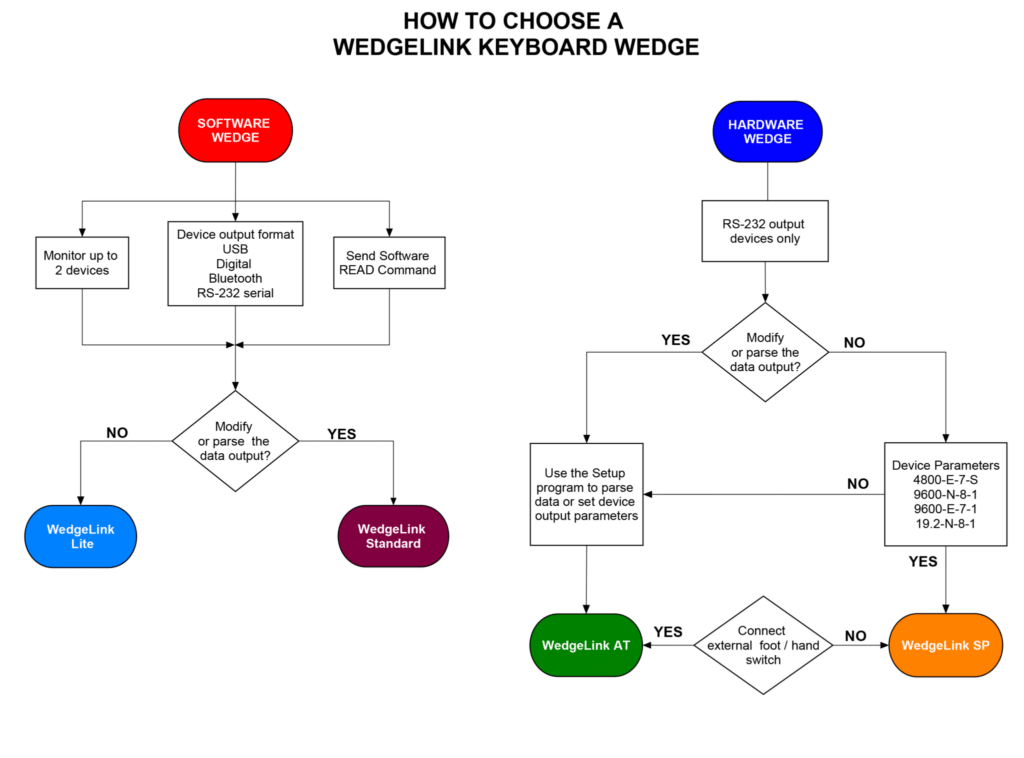
It depends on your instrument’s output and your deployment environment. If your device outputs clean data at a known, fixed baud rate and you want the simplest possible setup, the WedgeLink SP is the fastest path. If the data needs parsing, the baud rate is unknown, or you need a read switch, choose the WedgeLink AT. If you need to run two instruments at once, apply math functions, or already have COM port access on the workstation, WedgeLink Standard software is the better fit. Use the flowchart above for a quick visual walkthrough, or contact MicroRidge and we’ll help match a model to your instrument.
Yes. This is the most common use of a keyboard wedge. Because Excel only accepts keyboard input, a wedge is what allows a caliper, scale, or hardness tester connected via RS-232 to type a measurement directly into the active cell, with no manual transcription. See our guide to keyboard wedge output into Excel for setup examples, including automatic cell advance and splitting multi-field packets into separate columns.
Any device with an RS-232 serial output. Common examples include digital calipers, micrometers, and height gages; bench scales and force/torque gages; hardness testers; surface roughness testers; DROs on manual machines; CMMs with RS-232 output; barcode scanners; and data loggers or PLCs. If you’re not sure whether a specific instrument is compatible, contact MicroRidge with the make and model.
Yes. WedgeLink output is compatible with any Windows application that accepts keyboard input, which covers Excel, Minitab, InfinityQS, Access, and most cloud-based or web-based SPC and inspection platforms. WedgeLink Standard can also write parsed data directly to a CSV or TXT file in parallel with keyboard output.